so_long
A window, some images, some keys
A small 2D game in C on MiniLibX, which knows how to open a window, blit an image and report a key, nothing more. The map is a text file of five characters, drawn tile by tile. Nothing opens before it is declared closed, with one start, one exit and a path to every drop.
- Area
- 42
- game
- graphics
- Stack
- C, MiniLibX
- Grade
- 100%
- Date
- 2022
- Links
What the library does not do
MiniLibX is tiny, and that is the point. It can open a window, load an image from an XPM file, paste it at a position, and tell you when a key is pressed. There is no scene, no sprite, no game engine. Anything that looks like a game has to be written on top.
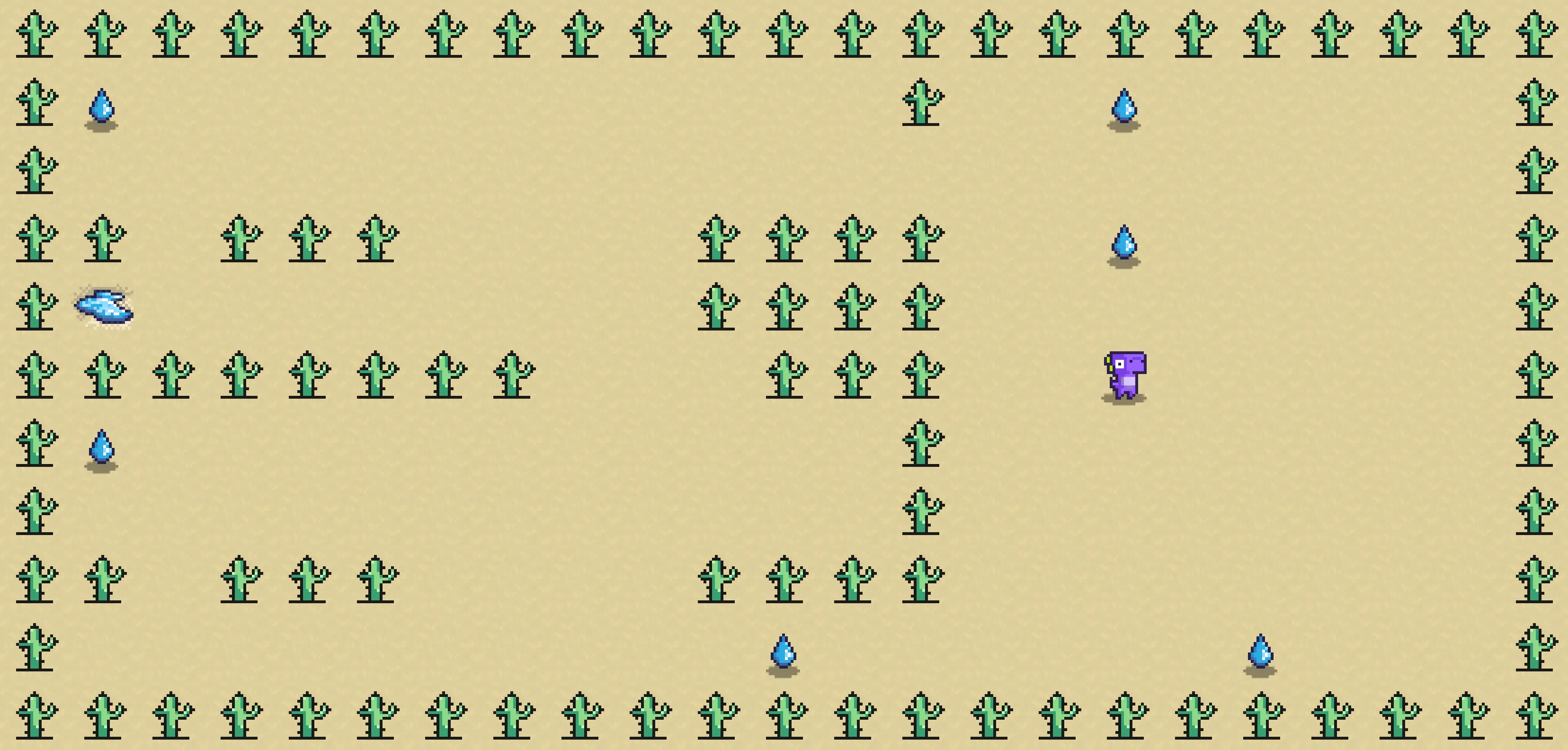
The game here is a top-down desert. A dinosaur collects water drops and leaves through a puddle, which only opens once the last drop is gone. The walls are cacti. W A S D to move, ESC to quit.
Five characters
The map is not in the code, it is in a .ber file: a rectangle of characters, five of them in all. 0 for sand, 1 for a wall, C for a drop, E for the exit, P for the starting position.
Each one has a texture seventy-two pixels square, and that is the whole renderer: the window is the width of the map times seventy-two, the height likewise, and every cell gets the image matching its letter. An eight-line text file becomes a level.

Check everything before opening
No window opens until the map has been declared valid. Rectangular, so every line the same length. Closed, so walled in on all four sides. Made of those five characters and no others. Exactly one start, exactly one exit, at least one drop.
These rules are not idle suspicion. An unclosed map lets the player walk off the board, and the program then reads memory that is not its own. A map that is not rectangular does the same thing, at the end of a line.
The path
The last check is the only interesting one. A map can be perfectly well formed and still unplayable: a drop fenced in behind cacti, an unreachable exit. So there has to be a path that collects everything and gets out.
The answer is one recursive function. It works on a copy of the map, starts from the player’s position, and marks the current cell before heading off in all four directions, stopping at a wall or at a cell already marked. Every drop and every exit it meets is counted. At the end, if the count reaches the number of drops plus the exit, everything is reachable.
Working on a copy matters: the marking destroys the map as it goes, and it is the original map that will have to be drawn.
Draw, and draw again
The renderer is deliberately naive. On every move the whole grid is redrawn, cell by cell, from the top left corner to the bottom right. Nothing is updated in place, nothing is remembered from one frame to the next.
At this scale, ten cells by eight, the difference does not show. The subject does not ask for optimisation but for an understanding of what a render loop is, and this is the most honest version of one: a state, a function that draws all of it, called after every change.
Movement itself comes down to two questions asked about the target cell. Is it a wall, in which case nothing moves. Is it the exit, in which case it can only be crossed if not a single drop is left. The move count prints to the terminal on every step, and the closing message says in how many moves the game was won.
Closing cleanly
Two events end the program: the escape key and the window’s close button. Both stop the loop rather than quitting mid-flight, which leaves time to give back what was taken: the five textures, the window, the graphics connection, and the two copies of the map.
It is the first project of the course where a program does not simply read, compute and write: it stays alive, waits, and has to know how to stop.